
Installing Oxygen
This guide walks you through installing the Oxygen Framework on your SCUM server using the automated updater tool.
Prerequisites
Before installing Oxygen, ensure you have:
- A SCUM server - You must have a dedicated SCUM server set up and accessible.
- Administrator access - Required for installing dependencies and creating firewall rules.
- Server file access - Ability to upload files to your server root directory.
- Server stopped - Shut down your SCUM server before installing Oxygen to avoid file conflicts.
System Requirements
The Oxygen updater automatically checks for and helps install these dependencies:
| Component | Required Version | Purpose |
|---|---|---|
| VC++ Redistributable | 2015-2022 (x64) | Core library support |
| .NET Runtime | 8.0+ | Plugin execution environment |
| OpenSSL | 3.x (x64) | Secure API communication |
| Firewall Rule | Port 8447 (TCP) | Web interface connectivity |
IMPORTANT
Oxygen requires .NET 8.0 Runtime, not .NET Framework. Make sure you install the correct version.
Antivirus notice
Because the plugin binary is obfuscated to prevent tampering, some antivirus engines may flag it as malware. This is a false positive; whitelist locally if needed.
Downloading the Updater
- Visit the Oxygen Updater GitHub Repository.
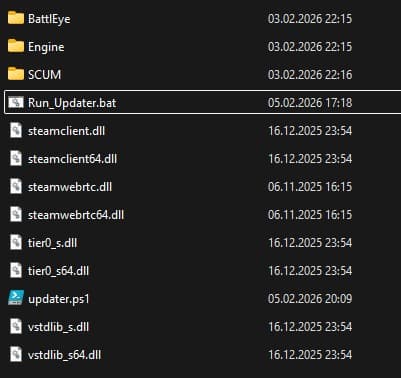
- Download the latest release (you'll get two files in arhive):
Run_Updater.batupdater.ps1
- Extract arhive to your SCUM server's root directory
Server Root Location
For most servers, this is: [YourDrive]:\SteamLibrary\steamapps\common\SCUM\
Running the Updater
First Time Setup
- Right-click on
Run_Updater.bat - Select "Run as Administrator" (required for dependency checks and firewall configuration)
- The updater will:
- Check for required dependencies (VC++, .NET 8.0, OpenSSL)
- Prompt you if any dependencies are missing with download links
- Request your API Token (on Server page COPY)
- Enter your API token when prompted
- The updater will:
- Download the latest Oxygen files
- Extract them to the correct directories
- Create a firewall rule for port 8447 (if needed)
Dependency Installation
If the updater detects missing dependencies, it will display download links. Install them in this order:
- VC++ Redistributable 2015-2022 (x64)
- Required for core Oxygen libraries
- .NET 8.0 Runtime (x64)
- Download the Desktop Runtime version
- Verify installation: run
dotnet --list-runtimesin PowerShell
- OpenSSL 3.x (x64)
- Required for secure web communication
After installing dependencies, run the updater again.
Verifying the Installation
After the updater completes successfully:
-
Check the server directory structure:
SCUM/ ├── Binaries/ │ └── Win64/ │ ├── oxygen/ ← Oxygen framework files created after first run │ │ ├── configs/ │ │ ├── data/ │ │ └── plugins/ │ ├── logs/OxygenErrors.log ← created after first run Run_Updater.bat updater.ps1 -
Start your SCUM server with -oxygen=API_KEY parameter
-
Check the server console for Oxygen initialization messages:
[OXYGEN] Successfully loaded [OXYGEN] plugin version 0.x.x -
Verify web interface (if applicable):
- The updater creates a firewall rule for port 8447
- Check firewall rules:
netsh advfirewall firewall show rule name="Oxygen Web Link"
IMPORTANT
You may need to open a port on the router are connected to.
Updating Oxygen
Run the updater regularly to keep Oxygen up to date:
- Stop your SCUM server
- Run
Run_Updater.batas Administrator - The updater will:
- Check for the latest Oxygen version via API
- Download and apply updates automatically
- Preserve your configs and data files
- Restart your server
WARNING
During updates, the updater will automatically detect and force-stop any running server processes to prevent file corruption.
Troubleshooting
Firewall Issues
If the web interface cannot connect:
- Manually create the firewall rule:
netsh advfirewall firewall add rule name="Oxygen Web Link" dir=in action=allow protocol=TCP localport=8447 - Verify the rule exists:
netsh advfirewall firewall show rule name="Oxygen Web Link"
Missing Dependencies
If plugins fail to load, verify .NET 8.0 is installed:
dotnet --list-runtimesYou should see: Microsoft.NETCore.App 8.0.x
Updater Fails to Download
- Check your API token is correct in
oxygen_license.json - Verify internet connectivity
- Check antivirus isn't blocking the download
- Run as Administrator
Files Not Updating
- Ensure the server is fully stopped before updating
- Check file permissions (updater needs write access)
- Temporarily disable antivirus during update
Next Steps
After successful installation:
- Set up owner permissions if you want use Permission system in plugins
- Install your first plugin
- Configure plugin settings
Getting Help
If you encounter issues:
- Check the updater output for error messages
- Review
SCUM/Binaries/Win64/logs/OxygenError.logfor detailed logs - Verify all prerequisites are met
- Contact Oxygen support with:
- Updater output/error messages
- Your system specifications
- Oxygen version you're trying to install